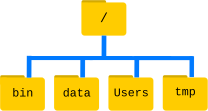
Image 1 of 1: ‘The file system is made up of a root directory that contains sub-directories titled bin, data, users, and tmp’
Figure 2
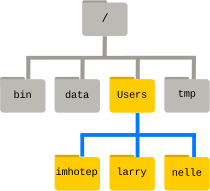
Image 1 of 1: ‘Like other directories, home directories are sub-directories underneath "/Users" like "/Users/imhotep", "/Users/larry" or"/Users/nelle"’
Figure 3
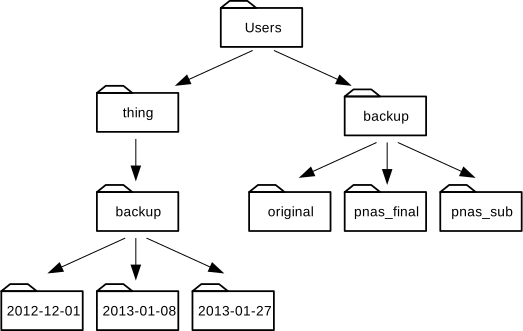
Image 1 of 1: ‘A directory tree below the Users directory where "/Users" contains the directories "backup" and "thing"; "/Users/backup" contains "original","pnas_final" and "pnas_sub"; "/Users/thing" contains "backup"; and"/Users/thing/backup" contains "2012-12-01", "2013-01-08" and"2013-01-27"’
Figure 4
Image 1 of 1: ‘A directory tree below the Users directory where "/Users" contains the directories "backup" and "thing"; "/Users/backup" contains "original","pnas_final" and "pnas_sub"; "/Users/thing" contains "backup"; and"/Users/thing/backup" contains "2012-12-01", "2013-01-08" and"2013-01-27"’
Image 1 of 1: ‘Redirects and Pipes of different commands: "wc -l *.pdb" will direct the output to the shell. "wc -l *.pdb > lengths" will direct output to the file"lengths". "wc -l *.pdb | sort -n | head -n 1" will build a pipeline where the output of the "wc" command is the input to the "sort" command, the output of the "sort" command is the input to the "head" command and the output of the"head" command is directed to the shell’
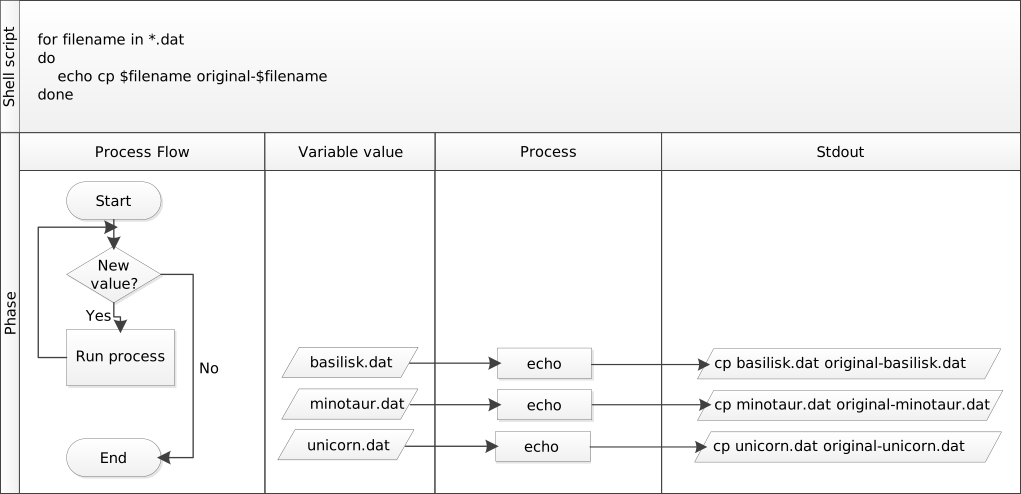
Image 1 of 1: ‘The for loop "for filename in .dat; do echo cp $filename original-$filename;done" will successively assign the names of all ".dat" files in your current directory to the variable "$filename" and then execute the command. With the files "basilisk.dat", "minotaur.dat" and "unicorn.dat" in the current directory the loop will successively call the echo command three times and print threelines: "cp basislisk.dat original-basilisk.dat", then "cp minotaur.datoriginal-minotaur.dat" and finally "cp unicorn.datoriginal-unicorn.dat"’