Testing on software forges
Questions
How can we implement automatic testing each time we push changes to the repository?
Why is it good to autoclose issues with commit messages?
“Continuous integration”
We will now learn to set up automatic tests using either GitHub Actions or GitLab CI/CD - you can choose which one to use and instructions are provided for both.
This exercise can be run in “collaborative mode” by following instead the instructions in Full collaborative workflow. In the collaborative version steps C-D below are performed by a collaborator.
Exercise CI-1: Create and use a continuous integration workflow on GitHub or GitLab
In this exercise, we will:
A. Create and add code to a repository on GitHub/GitLab (or, alternatively, fork and clone an existing example repository)
B. Set up tests with GitHub Actions/ GitLab CI/CD
C. Find a bug in our repository and open an issue to report it
D. Fix the bug on a bugfix branch and open a pull request (GitHub)/ merge request (GitLab)
E. Merge the pull/merge request and see how the issue is automatically closed.
F. Create a test to increase the code coverage of our tests.
Prerequisites
If you are new to Git, you can find a step-by-step guide to setting up repositories and making commits in this git-refresher material. If you are new to pull requests / merge requests, you can learn all about them in the Collaborative Git lesson.
Step 1: Create a new repository on GitHub/GitLab OR fork from the example repo
Create a new repository
Begin by creating a repository called (for example) example-ci.
Before you create the repository, select “Initialize this repository with a README” (otherwise you try to clone an empty repo).
Clone the repository (
git clone git@github.com:<yourGitID>/example-ci.git).Add the following files and code
Add a file functions.py containing:
def add(a, b):
    return a + b

def subtract(a, b):
    return a + b  # <--- fix this in step 7

def multiply(a, b):
    return a * b

def convert_fahrenheit_to_celsius(fahrenheit):
    return multiply(subtract(fahrenheit, 32), 9 / 5) # <-- Fix this in step 7
and a file test_functions.py containing:
from functions import add, subtract, multiply
from functions import convert_fahrenheit_to_celsius as f2c
import pytest

def test_add():
    assert add(2, 3) == 5
    assert add('space', 'ship') == 'spaceship'

# uncomment the following test in step 5
#def test_subtract():
#    assert subtract(2, 3) == -1

# uncomment the following test in step 11
# def test_convert_fahrenheit_to_celsius():
#    assert f2c(32) == 0
#    assert f2c(122) == pytest.approx(50)
#    with pytest.raises(AssertionError):
#        f2c(-600)
Finally, stage the files (git add <filename>), commit (git commit -m "some commit message"),
and push the changes (git push origin main).
Make a folder
rtestingexampleIn that folder create a file
DESCRIPTIONwith the following contents:Package: rtestingexample Title: Testing package for R and github actions Version: 0.0.0.9000 Authors@R: person("Your", "Name", , "none@example.com", role = c("aut", "cre"), ) Author: Your Name Maintainer: Your Name <none@example.com> Description: Just a few functions that are being tested. License: MIT Encoding: UTF-8 Depends: testthat Roxygen: list(markdown = TRUE) RoxygenNote: 7.2.3
In that folder create a file
NAMESPACEwith the following content:# Default NAMESPACE created by R # Remove the previous line if you edit this file # Export all names exportPattern(".") # Import all packages listed as Imports or Depends import( testthat )
create a subfolder
R(this will contain all functions of the package)in the
Rfolder create a filefunctions.Rwith the following content:add <- function(a,b){ return(a + b); } subtract <- function(a,b){ return(a - b); } multiply <- function(a,b){ return(a * b); } convert_fahrenheit_to_celsius <- function(fahrenheit){ C_temp <- multiply(subtract(fahrenheit,32),5/9); return(C_temp); }
create a subfolder
testsin
testscreate a foldertestthatand a filetestthat.Rwith the following content:# This file is part of the standard setup for testthat. # It is recommended that you do not modify it. # # Where should you do additional test configuration? # Learn more about the roles of various files in: # * https://r-pkgs.org/tests.html # * https://testthat.r-lib.org/reference/test_package.html#special-files library(testthat) library(rtestingexample) test_check("rtestingexample")
in the
testthatfolder create a filetest-functions.Rwith the following content:test_that(desc = "Add", code = { c <- add(2,3); # Runs the function # Test that the result is the correct value expect_equal(c,5); # Test that the result is numeric expect_true(is.numeric(c)); }) # uncomment the following test in step 11 #test_that(desc = "Fahrenheit to Celsius", code = { # # temp_C <- convert_fahrenheit_to_celsius(50); # expect_equal(temp_C,10); # expect_true(is.numeric(temp_C)); #}) # uncomment the following test in step 5 #test_that(desc = "Subtract", code = { # c <- subtract(3,2); # expect_equal(c,1); # expect_true(is.numeric(c)); #})
Fork and clone an existing example repository
Step 2: Run tests locally
You can now run your tests locally with
pytest
You can now run your tests (and a complete check of this package) locally by running:
Rscript -e 'testthat::test_local()'`
NOTE: You might need to install the testthat package before you can run the command above ( in R
install.packages("testthat"))
Step 3: Enable automated testing
In this step we will enable GitHub Actions. Select “Actions” from your GitHub repository page. You get to a page “Get started with GitHub Actions”. Select the button for “Configure” under Python Application:
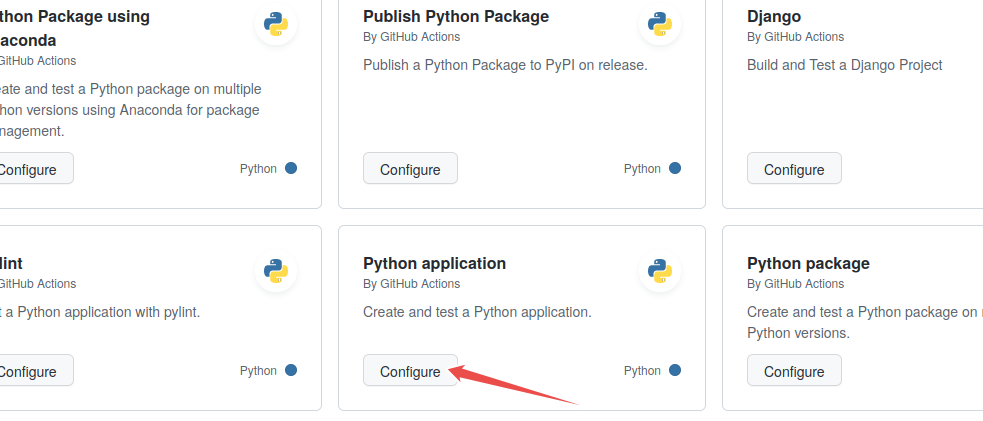
Select “Python application” as the starter workflow.
GitHub creates the following file for you in the subfolder .github/workflows.
Modify the highlighted lines according to the action below. This will add a code coverage
report to new pull requests. The if clause restricts this to pull requests, as otherwise
this action would not have a target to write the reports to. On pushes only the unittesting is run.
# This workflow will install Python dependencies, run tests and lint with a single version of Python
# For more information see: https://docs.github.com/en/actions/automating-builds-and-tests/building-and-testing-python

name: Test

on:
  push:
    branches: [ "main" ]
  pull_request:
    branches: [ "main" ]

permissions:
  contents: read
  pull-requests: write

jobs:
  build:

    runs-on: ubuntu-latest

    steps:
    - uses: actions/checkout@v4
    - name: Set up Python 3.10
      uses: actions/setup-python@v3
      with:
        python-version: "3.10"
    - name: Install dependencies
      run: |
        python -m pip install --upgrade pip
        pip install flake8 pytest pytest-cov
        if [ -f requirements.txt ]; then pip install -r requirements.txt; fi
    - name: Lint with flake8
      run: |
        # stop the build if there are Python syntax errors or undefined names
        flake8 . --count --select=E9,F63,F7,F82 --show-source --statistics
        # exit-zero treats all errors as warnings. The GitHub editor is 127 chars wide
        flake8 . --count --exit-zero --max-complexity=10 --max-line-length=127 --statistics
    - name: Test with pytest
      run: |
        pytest --cov-report "xml:coverage.xml" --cov=.
    - name: Create Coverage
      if: ${{ github.event_name == 'pull_request' }}
      uses: orgoro/coverage@v3
      with:
          coverageFile: coverage.xml
          token: ${{ secrets.GITHUB_TOKEN }}
Commit the change by pressing the “Start Commit” button:
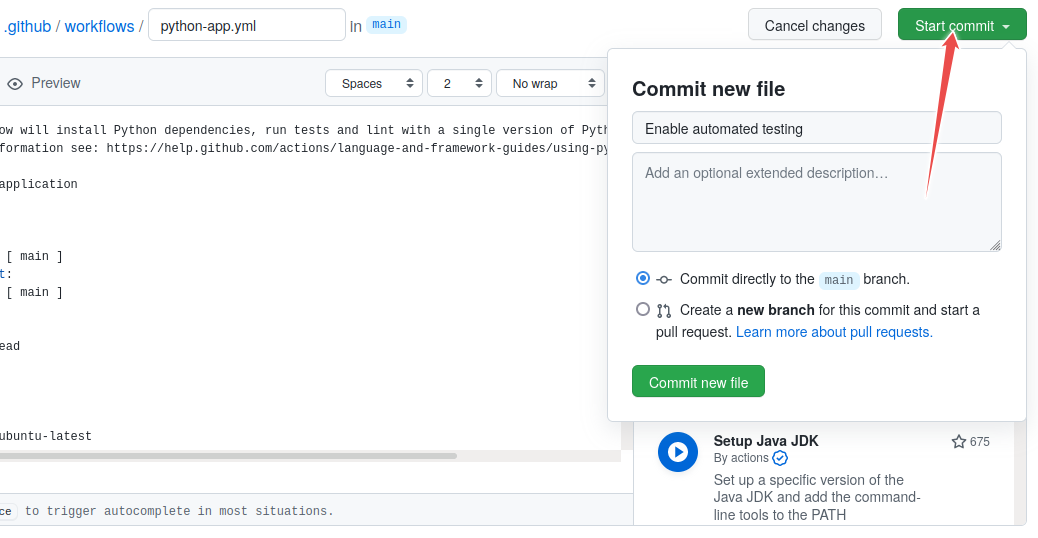
Committing the file via the GitHub web interface: follow the flow, give it some commit name. You can commit directly to master.
In this step we will enable GitLab CI.
Select “CI/CD” from your Gitlab sidebar of the project. You get to a page
“Editor”. (Instead you can also click on “Add CI/CD” on the main page or just add a .gitlab-ci.yml file the result is identical.
Copy the following code snippet into the file. Gitlab will save it as .gitlab-ci.yml.
Add pytest test_functions.py to the last line (highlighted):
# This workflow will install Python dependencies, run tests and lint with a single version of Python
# For more information see: https://gitlab.com/gitlab-org/gitlab/-/blob/master/lib/gitlab/ci/templates/Python.gitlab-ci.yml

image: python:latest
stages:
  - linting
  - test
before_script:
  - cat /proc/version #print out operations system
  - python -V  # Print out Python version for debugging
  - pip install pytest flake8
  - if [ -f requirements.txt ]; then pip install -r requirements.txt;fi

linting:
  stage: linting
  script:
    - flake8 . --count --select=E9,F63,F7,F82 --show-source --statistics
    - flake8 . --count --exit-zero --max-complexity=10 --max-line-length=127 --statistics

test:
  stage: test
  script:
    - pytest
Commit the change by pressing the “Commit changes” button:
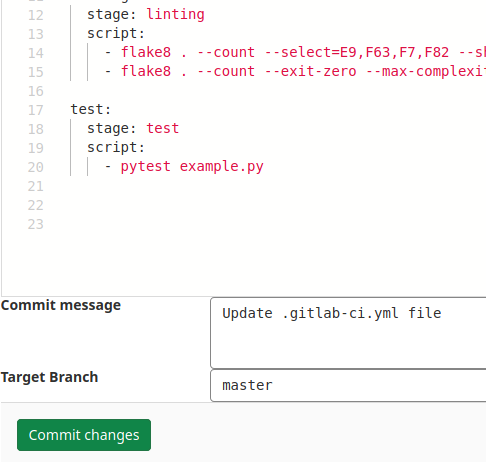
Committing the file via the GitLab web interface: follow the flow, give it some commit name. You can commit directly to master.
In this step we will enable GitHub Actions. Select “Actions” from your GitHub repository page. You get to a page “Get started with GitHub Actions”. Unfortunately, as of the creation of this lecture, the default “R package action” that is suggested by github is quite complex and not really fit for our purpose. Instead we will create our own workflow as detailed below. So first click on the “ set up a workflow yourself” link above the “Search workflows” field.
GitHub creates a “main.yml” file that we can now modify as needed.
First, replace the name by a more descriptive one (e.g. r_testing.yml)
Then add the following code to the file:
# Workflow derived from https://github.com/r-lib/actions/tree/v2/examples
# Need help debugging build failures? Start at https://github.com/r-lib/actions#where-to-find-help
on:
  push:
    branches: [main]
  pull_request:
    branches: [main]

name: test-coverage

jobs:
  test-coverage:
    runs-on: ubuntu-latest
    env:
      GITHUB_PAT: ${{ secrets.GITHUB_TOKEN }}
    name: R
    steps:
      - uses: actions/checkout@v3
      - name: Setup R
        uses: r-lib/actions/setup-r@v2
        with:
          use-public-rspm: true
      - uses: r-lib/actions/setup-r-dependencies@v2
        with:
          extra-packages: |
            any::covr
            any::rcmdcheck
          needs: |
            coverage
            check
          working-directory: 'rtestingexample'
      - name: Test coverage
        run: |
          covr::codecov(
            quiet = FALSE,
            clean = FALSE,
            path = "rtestingexample",
            install_path = file.path(Sys.getenv("RUNNER_TEMP"), "package")
          )
        shell: Rscript {0}

      - name: Show testthat output
        if: always()
        run: |
          ## --------------------------------------------------------------------
          find ${{ runner.temp }}/package -name 'testthat.Rout*' -exec cat '{}' \; || true
        shell: bash

      - name: Upload test results
        if: failure()
        uses: actions/upload-artifact@v3
        with:
          name: coverage-test-failures
          path: ${{ runner.temp }}/package
The action is a modified version of the action generated by covr using the
usethis::use_github_action("test-coverage")command. It is built up from several actions provided by the r-lib project, along with the test/coverage commands.
Commit the change by pressing the “Start Commit” button:
Committing the file via the GitHub web interface: follow the flow, give it some commit name. You can commit directly to master.
Step 4: Verify that tests have been automatically run
Observe in the repository how the test succeeds. While the test is executing, the repository has a yellow marker. This is replaced with a green check mark, once the test succeeds:
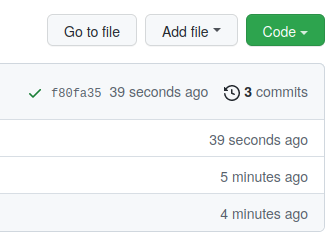
Green check means passed.
Also browse the “Actions” tab and look at the steps there and their output.
Observe in the repository how the test succeeds. While the test is executing, the repository has a blue marker. This is replaced with a green check mark, once the test succeeds:
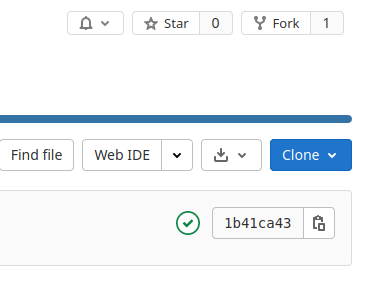
Green check means passed.
Also browse the “Pipelines” tab and look at the steps there and their output.
Observe in the repository how the test succeeds. While the test is executing, the repository has a yellow marker. This is replaced with a green check mark, once the test succeeds:
Green check means passed.
Also browse the “Actions” tab and look at the steps there and their output.
Step 5: Add a test which reveals a problem
After you committed the workflow file, your GitHub/GitLab repository will be ahead of your local cloned repository. Update your local cloned repository:
$ git pull origin main
Hint: if the above command fails, check whether the branch name on the GitHub/GitLab
repository is called main and not perhaps master.
Next uncomment the code in test_functions.py under “step 5”, commit, and push.
Verify that the test suite now fails on the “Actions” tab (GitHub)
or the “CI/CD->Pipelines” tab (GitLab).
Step 6: Open an issue on GitHub/GitLab
Open a new issue in your repository about the broken test (click the “Issues” button on GitHub or GitLab and write a title for the issue). The plan is that we will fix the issue through a pull/merge request.
Step 7: Fix the broken test
Now fix the code on a new branch, you can call it yourname/bugfix.
After you have fixed the code on the new branch, commit the following
commit message "restore function subtract; fixes #1" (assuming that
you try to fix issue number 1).
Shortcut
Here it’s perfectly possible to take a shortcut and commit and push directly to the main branch. If you do this, steps 8-9 below are skipped.
When would you push directly to the main branch, and when would you send a pull/merge request?
Then push to your repository.
Step 8: Open a pull request (GitHub)/ merge request (GitLab)
Go back to the repository on GitHub or GitLab and open a pull/merge request. In a collaborative setting, you could request a code review from collaborators at this stage. Before accepting the pull/merge request, observe how GitHub Actions/ Gitlab CI automatically tested the code.
If you forgot to reference the issue number in the commit message, you
can still add it to the pull/merge request: my pull/merge request title, closes #1.
Step 9: Accept the pull/merge request
Observe how accepting the pull/merge request automatically closes the issue (provided the commit message or the pull/merge request contained the correct issue number).
See also:
GitHub: closing issues using keywords
GitLab: closing issues using keywords
Discuss whether this is a useful feature. And if it is, why do you think is it useful?
Step 10: Increase your code coverage
We are currently missing several functions in our tests. Write a test for the multiply function in a new branch and create a pull request.
On Python you can directly observe the increase in code coverage.
On R you can have a look at the action (Actions -> last run of your action -> Select a job -> Test coverage). If you compare this with the
previous run, you should see an increase once the update is in.
Step 11 (optional): Repeat steps 5-9 for the convert_fahrenheit_to_celsius function:
Repetition helps learning, so let’s do the testing again for our convert_fahrenheit_to_celsius function.
Uncomment the test for the convert_fahrenheit_to_celsius function and repeat steps 5 to 9 fixing the bug this test exposes.
Discussion
Finally, we discuss together about our experiences with this exercise.
Where to go from here
This example was using Python but you can achieve the same automation for R or Fortran or C/C++ or other languages
This workflow is very useful for collaborators who work on the same code and it works both for centralized and forking workflows - have a look at this alternative exercise to see how that works.
GitHub Actions has a Marketplace which offer wide range of automatic workflows
On GitLab use GitLab CI
For Windows builds you can also use Appveyor
Keypoints
When fixing bugs or other problems reported in issues, use the issue autoclosing mechanism when you send the pull/merge request.